11 Appendix C: Generalization — Training, Testing, and Evaluation
How do we know if a model actually learned something useful, or just memorized the examples it was shown? This appendix builds the conceptual vocabulary for answering that question. We cover what a model is in the context of this book, how we measure its errors, why a model that looks perfect on training data can fail on new data, and how to design experiments that reveal the truth.
11.1 What is a Model?
In the context of this course, a model is not necessarily a neural network. A model is any system that maps inputs to outputs — and in our image segmentation pipeline, the model is the entire preprocessing and thresholding workflow you have been building.
Concretely, the model described in this book is:
- A sequence of image processing operations — grayscale conversion, noise filtering, sharpening — each with tunable parameters (filter kernel size, blur strength, unsharp amount)
- Threshold values — a nucleus threshold \(T_\text{nuc}\) that separates nucleus pixels from cytoplasm, and a cytoplasm threshold \(T_\text{cyt}\) that separates cytoplasm from background. These two numbers define where the boundary between classes falls.
- An optimal set of those thresholds, found by Bayesian Optimization — the algorithm from Appendix B that intelligently searches the 2D space \((T_\text{nuc}, T_\text{cyt})\) to maximize segmentation quality.
The parameters of this model are the threshold values \(T_\text{nuc}\) and \(T_\text{cyt}\) (and optionally the pipeline settings). Training in this context means running Bayesian Optimization on a labeled set of cell images to find the threshold pair that maximizes Dice score.
This is analogous to how a neural network has millions of numerical weights that are adjusted during training — here we have just two (or a handful of) parameters, but the concept is identical: we search for the values that make predictions best match the ground truth.
A model is always a simplification of reality. The threshold model assumes that nucleus pixels are consistently brighter (or darker) than cytoplasm pixels by a fixed margin. When that assumption holds — consistent staining, consistent lighting — the model works well. When it breaks, the model fails.
Quiz: What is a Model?
In the pipeline described in this book, what plays the role of “model parameters” that get optimized?
11.2 Loss and Error
To optimize a model, we need a single number that measures how wrong the current parameter values are. This is called the loss (also: cost, objective, or error).
The loss function compares the model’s output against the correct answer. Low loss = predictions close to truth; high loss = predictions far off.
11.2.1 Common Loss Functions
Mean Squared Error (MSE) — the most common loss for regression (predicting a number):
\[\text{MSE} = \frac{1}{n} \sum_{i=1}^{n} (y_i - \hat{y}_i)^2\]
where \(y_i\) is the true value and \(\hat{y}_i\) is the predicted value.
Cross-Entropy Loss — standard for classification problems (predicting a category):
\[\mathcal{L} = -\sum_{c} y_c \log(\hat{p}_c)\]
where \(y_c = 1\) if class \(c\) is the correct answer and \(\hat{p}_c\) is the model’s confidence in class \(c\).
Dice Loss — designed for segmentation, directly derived from the overlap metric:
\[\mathcal{L}_{\text{Dice}} = 1 - \frac{2|X \cap Y|}{|X| + |Y|}\]
Dice Loss is 0 when segmentation is perfect, 1 when there is zero overlap. In our pipeline, Bayesian Optimization minimizes this loss (or equivalently, maximizes the Dice score) by searching for the best threshold values.
11.2.2 The Optimization Loop
Whether you are training a neural network or running Bayesian Optimization on thresholds, the same idea applies:
- Try a set of parameter values
- Compute the loss on labeled examples
- Move the parameters toward values that reduce the loss
- Repeat until the loss stops improving
After many iterations, the loss on the examples you used for optimization decreases — but this alone does not tell you whether the model will work on new images it has never seen.
Quiz: Loss and Error
After Bayesian Optimization, your pipeline achieves a Dice Loss of 0.18 on the images used for optimization. A colleague says “that means 18% of pixels are wrong.” Is this correct?
11.3 The Bias-Variance Tradeoff
Every model makes two kinds of errors, and they pull in opposite directions.
Bias is the error from wrong assumptions. A high-bias model is too simple — it misses the true pattern and consistently makes the same type of mistake everywhere. This is called underfitting.
Variance is the error from over-sensitivity to specific training examples. A high-variance model fits its training data perfectly but changes wildly with slightly different inputs. This is called overfitting.
The total expected prediction error decomposes as:
\[\text{Error} = \text{Bias}^2 + \text{Variance} + \text{Irreducible Noise}\]
The irreducible noise comes from inherent ambiguity in the data (labeling errors, measurement noise) and cannot be reduced by any model. The goal is to balance bias and variance.
Bias and Variance in this formula are theoretical averages over many hypothetical training sets drawn from the same distribution — not numbers you can calculate from a single experiment. Bias measures how far the average prediction (across all those training sets) sits from the true answer. Variance measures how much individual predictions scatter around that average. The illustrations below give direct intuition for both.
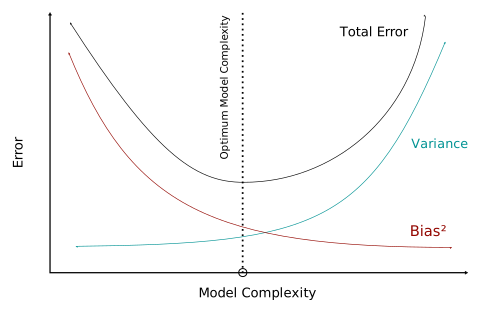
The left side of the curve is the underfitting regime: the model is too simple, so bias² dominates and total error is high regardless of how much data you have. The right side is the overfitting regime: the model is so complex it memorizes the training set, variance explodes, and performance on new data collapses. The minimum of the total-error curve is the target — complex enough to capture the true pattern, simple enough not to chase noise.
| High Bias | Low Bias | |
|---|---|---|
| High Variance | Rare | Overfitting — perfect on training data, poor on new data |
| Low Variance | Underfitting — poor everywhere | Ideal — generalizes well |
In our thresholding pipeline: a single global threshold for the entire dataset is high-bias (it treats all images as identical). A threshold perfectly tuned to each individual training image is high-variance (it cannot generalize to new images).
Quiz: The Bias-Variance Tradeoff
Your pipeline achieves Dice = 0.91 on the 20 images used for Bayesian Optimization, but only Dice = 0.54 on 10 new images from a different lab. Which situation best describes this?
11.4 Overfitting and Underfitting
The interactive widget below demonstrates the bias-variance tradeoff concretely. Twenty training points (blue) were generated from a hidden curve (dashed) with added noise. Use the slider to fit a polynomial of increasing degree and observe what happens to training and test errors.
Try dragging the slider from left to right:
- Degree 1–2 (underfitting): The line is too rigid to follow the data. Both training and test errors are high — the model is too simple.
- Degree 3–5 (good fit): The curve captures the true pattern. Training error is moderate; test error is similar — the model generalizes.
- Degree 7–10 (overfitting): The curve twists to pass through every training point, driving training error nearly to zero. Test error spikes — the model has memorized noise rather than learned the true function.
Quiz: Overfitting and Underfitting
In the interactive widget, you drag the slider to degree 9. Training MSE drops to nearly zero, but test MSE is much higher than at degree 4. Which term best describes this model’s behavior?
11.4.1 Overfitting in Image Segmentation
The interactive example above uses a toy polynomial, but the same failure mode appears concretely in our cell segmentation pipeline.
Scenario: You optimize threshold values \((T_\text{nuc}, T_\text{cyt})\) using Bayesian Optimization on 20 urothelial cell images acquired in one session in Lab A. The pipeline achieves Dice = 0.88. You then apply it to 15 new images from Lab B — and Dice drops to 0.49.
What went wrong? The thresholds overfit to the specific visual characteristics of Lab A’s images. Common causes include:
Lighting and exposure differences. The threshold \(T_\text{nuc}\) you found assumes that nuclei occupy a specific intensity range (e.g., 160–220 on a 0–255 scale). If Lab B’s microscope has a different gain setting or exposure time, the intensity range of nuclei shifts entirely. A threshold tuned for one exposure will misclassify pixels in another.
Staining variations. H&E staining and other histological stains vary batch-to-batch and lab-to-lab. A nucleus that appears dark purple in one slide may appear lighter or with a different hue in another, changing how grayscale intensities distribute across classes.
Image inversions. Some microscopes capture images where nuclei appear bright on a dark background; others produce the opposite. A thresholding pipeline tuned to “dark nucleus” will fail completely on an inverted image — every nucleus prediction will be background and vice versa.
Tissue density and cell size variation. Cells in different patients or different tissue regions vary in size, packing density, and nuclear-to-cytoplasmic ratio. A threshold calibrated for densely packed cells may under- or over-segment sparse cells.
Camera sensor and compression artifacts. JPEG compression, sensor noise patterns, and bit-depth differences between acquisition systems all shift the intensity histograms in ways that invalidate a fixed threshold.
11.4.2 What Can Be Done?
Test on diverse data. The most direct mitigation is building a test set that represents the real distribution of variation — images from multiple labs, multiple sessions, multiple patients. Low test-set Dice on diverse data is an honest signal that the model will fail in deployment.
Histogram normalization. Before thresholding, normalize each image’s intensity histogram to a standard range (e.g., CLAHE, percentile stretching). This reduces the sensitivity to exposure and gain differences.
Data augmentation. When training a learned model (deep network), artificially vary the training images: random brightness/contrast jitter, simulated stain normalization, horizontal/vertical flips. This forces the model to learn features that are invariant to those transformations.
Stain normalization. For histology images specifically, methods like Macenko or Vahadane decompose the stain into component vectors and re-color each image to a reference palette before processing.
Per-image adaptive thresholding. Instead of a single global threshold, use local or adaptive thresholding (e.g., Otsu’s method per image, or skimage’s threshold_local) that recalibrates to each image’s own intensity distribution. This dramatically reduces sensitivity to exposure variation.
Larger and more diverse training sets. More images from more sources during optimization gives the Bayesian optimizer a broader picture of what “good segmentation” looks like, reducing the chance of tuning to a single lab’s peculiarities.
Quiz: Overfitting in Image Segmentation
Your pipeline achieves Dice = 0.88 on Lab A training images but only Dice = 0.49 on new Lab B images. Which mitigation most directly addresses sensitivity to Lab B’s different microscope exposure settings?
11.5 Train and Test Split
To measure how well a model generalizes, we need examples it has never seen during training. The standard practice is to split the dataset into two parts before touching any model:
- Training set — used to optimize the model’s parameters (run Bayesian Optimization here)
- Test set — held out entirely; used only once at the end to report final performance
A typical split is 80% training / 20% test. The key principle: the test set must be completely isolated. If any decision — including which threshold range to search, which preprocessing steps to use, or which images to include — is influenced by looking at test set performance, the estimate is no longer trustworthy.
from sklearn.model_selection import train_test_split

X_train, X_test, y_train, y_test = train_test_split(
    images, labels,
    test_size=0.2,      # 20% held out for testing
    random_state=42,    # reproducible split
    stratify=patient_ids  # keep patient proportions balanced
)
For medical imaging, split by patient, not by image. If a patient has five cell images and two go into training while three go into test, the model may “recognize” cell characteristics of that patient — a form of data leakage (covered below).
11.5.1 Stratification
A naive random split can accidentally group all similar images into one partition. If your dataset contains a wide range of cell sizes — some images with tiny compact nuclei, others with large spread nuclei — a random 80/20 split might, by chance, concentrate most large-nucleus images in the test set. The model would then be trained only on small-nucleus images, and the test Dice would measure performance on a morphology the model never saw. That gap would look like a generalization failure when it is really just a lopsided split.
Stratification fixes this by ensuring each subgroup of images is represented proportionally in both train and test. When you pass stratify=some_label_array to train_test_split, it independently preserves the proportion of each label value across the split — so if 25% of your images belong to the “large nucleus” group, roughly 25% of your training images and roughly 25% of your test images will also come from that group.
Stratification by Nucleus Size — A Concrete Example
In Lab 02 on Bayesian Optimisation, we stratify the split by nucleus size quartile. Here is how it works, step by step:
Step 1 — Measure nucleus size for each image
nucleus_size = (y == 2).sum(axis=(1, 2))y is a 3D array of shape (N, H, W) — one integer label mask per image, where each pixel is 0 (background), 1 (cytoplasm), or 2 (nucleus). The expression y == 2 produces a boolean array of the same shape: True wherever a pixel is nucleus, False everywhere else. Calling .sum(axis=(1, 2)) then collapses the two spatial dimensions (height and width) by summing across them for each image, leaving a 1D array of shape (N,). Each entry is the total count of nucleus pixels in that image — a proxy for how large the nucleus region is.
Step 2 — Find the quartile boundaries
np.percentile(nucleus_size, [25, 50, 75])np.percentile(a, q) returns the value below which q% of the data falls. Passing the list [25, 50, 75] returns three numbers — the boundaries that divide the distribution into four equal-sized groups (quartiles):
- 25th percentile: the nucleus size below which the smallest 25% of images fall
- 50th percentile (median): the midpoint — half of images are smaller, half larger
- 75th percentile: the nucleus size below which 75% of images fall
For example, if these return [312, 487, 651], it means 25% of images have fewer than 312 nucleus pixels, 50% have fewer than 487, and 75% have fewer than 651.
Step 3 — Assign each image to a quartile bin
quartile = np.digitize(nucleus_size, np.percentile(nucleus_size, [25, 50, 75]))np.digitize(x, bins) maps each value in x to a bin index based on the boundary values in bins. Given the three boundary values from Step 2, it defines four bins:
| Bin | Range |
|---|---|
| 0 | nucleus_size < 25th percentile (smallest nuclei) |
| 1 | 25th ≤ nucleus_size < 50th percentile |
| 2 | 50th ≤ nucleus_size < 75th percentile |
| 3 | nucleus_size ≥ 75th percentile (largest nuclei) |
The result quartile is a 1D integer array of shape (N,), where each entry is 0, 1, 2, or 3 — the quartile bin that image belongs to. This array is what we hand to stratify.
Step 4 — Split with stratification
train_idx, test_idx = train_test_split(
    np.arange(N), test_size=0.2, stratify=quartile, random_state=42
)
Notice we are splitting np.arange(N) — an array of image indices [0, 1, 2, ..., N-1] — rather than the images themselves. That gives us back two index arrays, train_idx and test_idx, which we then use to slice X and y.
The stratify=quartile argument tells train_test_split to treat quartile as a grouping label. Instead of picking train/test images uniformly at random, it ensures that roughly 80% of bin-0 images go to train and 20% go to test — and the same for bins 1, 2, and 3 independently. The result: both splits see the same proportion of small, medium, and large nuclei.
Why Stratification Matters
Without stratification, a random split is just a coin flip applied independently to each image. With 50 images and a small subgroup — say, 8 images with unusually large nuclei — a random 80/20 split might assign 6 of those 8 to test and only 2 to train. Bayesian Optimization would then tune thresholds almost entirely on small and medium nuclei; any large-nucleus image it encounters in deployment would be poorly segmented. The test Dice would look bad, but the root cause is the split, not the model.
Stratification guarantees that every subgroup contributes proportionally to both sides of the split. A performance gap between train and test Dice after stratification is a genuine signal about the model’s generalization — not a statistical accident from an unrepresentative split.
Stratification requires each stratum to have enough members to contribute at least one example to each split. With four quartile bins and a 20% test fraction, you need at least five images per bin (so that one goes to test). For very small datasets, consider using fewer strata — for example, just two bins (above and below median) — to avoid bins so small they cannot be split.
Quiz: Train and Test Split
You run Bayesian Optimization 10 times with different random seeds, then select the threshold pair that achieves the highest Dice on the test set. Why is this problematic?
11.6 Validation Set and Cross-Validation
When you want to compare multiple pipeline configurations or tune hyperparameters, you need a third partition: the validation set.
| Split | Purpose |
|---|---|
| Training set | Run Bayesian Optimization to find best thresholds |
| Validation set | Compare pipeline variants / tune preprocessing parameters |
| Test set | Report final unbiased performance — touch only once |
A common split is 70% train / 15% validation / 15% test.
11.6.1 Cross-Validation
When data is scarce, a fixed validation set wastes examples. K-fold cross-validation cycles through the data:
- Divide the training set into \(k\) equal folds (typically \(k = 5\) or \(k = 10\))
- For each fold \(i\): optimize on the other \(k-1\) folds, evaluate on fold \(i\)
- Report the average score across all \(k\) folds
from sklearn.model_selection import cross_val_score, KFold

kf = KFold(n_splits=5, shuffle=True, random_state=42)
# Each fold: optimize thresholds on 4/5 of train data, evaluate on remaining 1/5
cv_dice_scores = []

for train_idx, val_idx in kf.split(X_train):
    X_fold_train, X_fold_val = X_train[train_idx], X_train[val_idx]
    y_fold_train, y_fold_val = y_train[train_idx], y_train[val_idx]
    # ... run Bayesian Optimization on fold_train, evaluate on fold_val
    # cv_dice_scores.append(fold_dice)

print(f"CV Dice: {np.mean(cv_dice_scores):.3f} ± {np.std(cv_dice_scores):.3f}")
Cross-validation gives a more reliable performance estimate because every example is used for validation exactly once. The test set remains untouched throughout.
Quiz: Cross-Validation
You have 60 labeled cell images from 12 patients (5 images per patient). You want to use 5-fold cross-validation to evaluate your pipeline. Which splitting strategy is most appropriate?
11.7 Data Leakage
Data leakage occurs when information from outside the training set flows into the model during optimization, making performance estimates unrealistically optimistic. It is one of the most common and consequential mistakes in machine learning projects.
11.7.1 Common Leakage Scenarios
Preprocessing leakage. Computing normalization statistics on the full dataset before splitting, then using those statistics during training. The normalization has already “seen” the test images.
# WRONG — scaler sees all images including test set
scaler = StandardScaler()
X_normalized = scaler.fit_transform(all_images)
X_train, X_test = train_test_split(X_normalized, ...)

# CORRECT — fit scaler only on training images
X_train, X_test = train_test_split(all_images, ...)
scaler = StandardScaler()
X_train = scaler.fit_transform(X_train)   # fit on train only
X_test  = scaler.transform(X_test)        # apply same transform
Patient leakage. Multiple images of the same patient appear in both training and test sets. The model may learn patient-specific tissue characteristics rather than generalizing to new patients. Always split by patient ID, not by image.
Augmentation leakage. Applying data augmentation (brightness jitter, flips, noise) to the full dataset before splitting. Augmented copies of test images end up in the training set.
Threshold selection leakage. Choosing the threshold search range for Bayesian Optimization based on visual inspection of test set images. Even informal decisions like “I noticed nuclei in the test images look brighter, so I’ll extend the search range upward” constitute leakage.
11.8 Evaluation Metrics
11.8.1 General Machine Learning Metrics
Before introducing segmentation-specific metrics, it is useful to understand the broader landscape of metrics used across machine learning.
Accuracy is the fraction of all examples classified correctly:
\[\text{Accuracy} = \frac{\text{Correct predictions}}{\text{Total predictions}}\]
Accuracy is intuitive but misleading when classes are imbalanced. If 95% of pixels in a cell image are background, a model that predicts “background” for every pixel achieves 95% accuracy — while completely failing at its actual job.
Precision and Recall address the imbalance problem by focusing on a specific class.
\[\text{Precision} = \frac{\text{True Positives}}{\text{True Positives} + \text{False Positives}} \qquad \text{Recall} = \frac{\text{True Positives}}{\text{True Positives} + \text{False Negatives}}\]
- Precision answers: of all pixels the model labeled as nucleus, what fraction actually are nucleus?
- Recall answers: of all pixels that truly are nucleus, what fraction did the model correctly find?
A model can cheat on precision by predicting very few nucleus pixels (only the most obvious ones) — it will rarely be wrong, but miss most nuclei. A model can cheat on recall by labeling everything as nucleus — it will find all nuclei, but flood the image with false positives.
F1 Score is the harmonic mean of precision and recall, penalizing extreme imbalance between the two:
\[\text{F1} = \frac{2 \times \text{Precision} \times \text{Recall}}{\text{Precision} + \text{Recall}}\]
F1 = 1 only when both precision and recall are 1. F1 = 0 when either is 0. This makes it a more honest single-number summary for imbalanced classification.
ROC Curve and AUC. For models that output a confidence score (probability), the Receiver Operating Characteristic (ROC) curve plots True Positive Rate (= Recall) against False Positive Rate at every possible threshold. The Area Under the Curve (AUC) summarizes the curve as a single number between 0 and 1. AUC = 0.5 means the model is no better than random guessing; AUC = 1.0 means perfect ranking of positives above negatives.
11.8.2 Segmentation-Specific Metrics
Standard classification metrics treat each pixel independently. But segmentation quality depends on spatial agreement — a mask that is slightly shifted but correctly shaped is better than one that randomly misclassifies isolated pixels. The following metrics capture spatial overlap and are the standard in medical image segmentation.
11.8.3 Dice Coefficient (F1 Score)
The Dice coefficient measures overlap between two binary masks:
\[\text{Dice} = \frac{2|X \cap Y|}{|X| + |Y|}\]
Note that Dice is mathematically identical to F1 score when applied to binary classification. The numerator \(2|X \cap Y|\) equals \(2 \times \text{TP}\), and the denominator equals \(2\text{TP} + \text{FP} + \text{FN}\) — the same as the F1 denominator.
- Dice = 1.0: Perfect overlap
- Dice ≥ 0.7: Generally considered acceptable for medical segmentation
- Dice < 0.5: Poor segmentation
11.8.4 Intersection over Union (IoU / Jaccard Index)
\[\text{IoU} = \frac{|X \cap Y|}{|X \cup Y|}\]
Dice and IoU are related: \(\text{Dice} = \frac{2 \times \text{IoU}}{1 + \text{IoU}}\). IoU is stricter — an IoU of 0.7 corresponds to a Dice of approximately 0.82. IoU is commonly used as the primary metric in computer vision competitions.
11.8.5 Per-Class Metrics
For our three-class problem (background, cytoplasm, nucleus), compute Dice and IoU separately for each class. Mean Dice alone can be misleading: a model that correctly segments background (which dominates by pixel count) but misses all nuclei can still report a mean Dice above 0.6. Always examine per-class scores.
11.9 Exercises
The following exercises are graded. Click Submit when you have a working solution. Each exercise is worth 5 points.
Exercise 1: Train-Test Split and Dice Evaluation
Given the arrays below representing a segmentation experiment, split the data into 80% train and 20% test (use random_state=0). For the test split, compute the per-class Dice coefficient for each class (0, 1, 2) by flattening all test images into a single array. Print mean Dice rounded to 3 decimal places.
Exercise 2: Detecting Overfitting
The cell below generates synthetic data and provides a 75/25 train-test split. For each polynomial degree 1–8, compute train MSE and test MSE using np.polyfit and np.polyval. Print a formatted table, then print the degree that minimizes test MSE.
Exercise 3: Identifying Data Leakage
Four code snippets are shown below. Inspect each one and identify which contain data leakage. Print your answer explaining which snippet(s) leak and why.